
Yoast has recently launched a new update for the Yoast SEO plugin, now on version 3.0. Many people have spotted the warning message in the WordPress dashboard saying ‘Your Homepage can not be indexed by search engines’. Now this is a very scary warning message to have but what does not help, is the link that Yoast provide as a solution just leads you to a generic page on the Yoast website. So with no solution in sight, what should you do?

Solution!
- Simply head to the WordPress Dashboard
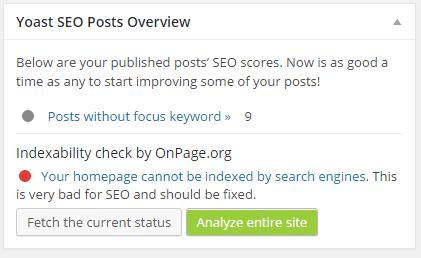
- Scroll down till you see the ‘Yoast SEO Post Overview’ section
- Then click ‘Fetch the current status’
- Then refresh the page once the fetch is complete
Just for those who are struggling to find it, here is what the yoast section looks like on the WP dashboard:


4 Responses
This is great except in my WordPress Dashboard I’m not seeing a Yoast SEO Posts overview box. Where on your dashboard is this located? I went into the Yoast SEO settings and could not find anything that looks like your image. Thanks!
Hey Karen,
Have you checked the main WordPress dashboard? You may need to enable the view in screen options which should be displayed on the top right hand corner of the wordpress dashboard. The other thing that I would check is your account level access. I am not sure if only admins can see it so might be worth checking that you have full admin access.
This is nice! Thank you for sharing.
Nice info for Fix Yoast 3.0 Home Page Index Issue
Thanks for sharing